
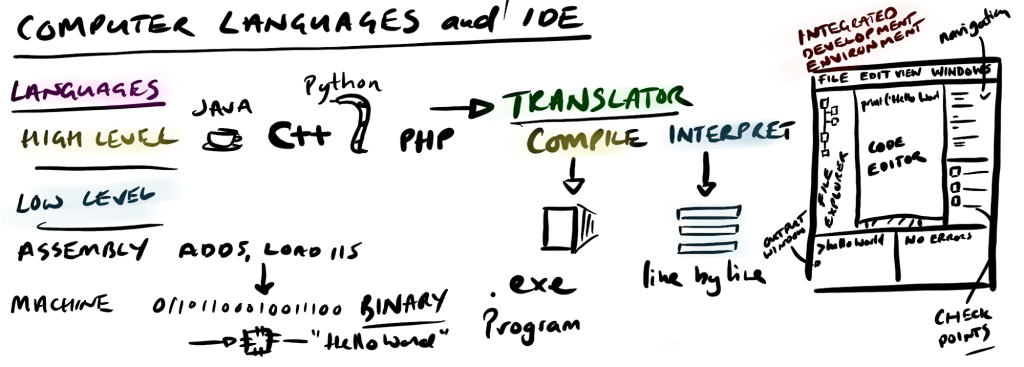
We have covered the computer systems and the hardware that builds a computer and the fundamentals of computer programming that builds software. Great but how do we actually create software? To build computer software we need a couple of things:
- A way to write instructions and data (write)
- A way to store the instructions and data (store)
- A way to load and run the instructions and data (run)
We have covered point 2 in the memory and storage and point 1 is the systems architecture. Point 1 is the where most programmers start – writing instructions and data and to do that you need to pick a computer language. And there a lot of computer languages.
Languages
Before we get into the detail of the two types of computer language we need to call out what is not a computer language. The web page you are reading is structured with HTML – hypertext markup language. Despite the language part HTML is not a programming language but a mark-up language which means the web browser is able to structure the page based on additional information in the same way that a letter can be marked up into bold, italics or underline. Another one that may crop up is unified modeling language (UML). This is a way to draw models of different things and systems.
There are two levels of computer language based on where we load the code. Picturing it way will help to remember the two types.
High-level languages
High level languages that are written close to a human readable form e.g. print(“hello world”). Any language which allows you to do this is a high-level language. Like all languages for someone to understand this it needs to be translated into a more basic language.
Types of High-Level Programming Language
Like the real world of linguistic languages there are lots of different programming languages and the reason why there are so many languages is the same reason there are so many lingustic ones – history and use.
In the early days of computer programming it wasn’t really programming but setting up or configuration so when the computer ran it turned out the answers required. The next step was programming by feeding in the instructions the “program” which would then run when the machine ran. These instructions told the computer how to work like following the instructions to make a cake:
make_cake(flour, egg, butter)
 recipe = flour + egg + butter
 oven_heat = 200
 add recipe to bowl
 mix recipe in bowl
 place recipe in tin
 place tin in oven
 wait 40minutes
 remove tin from oven
 cake = ingredients
 remove cake
 eat cake
return cake
This idea of programming a computer is the same as we program or setup any machine – we feed instructions and then press go. This way or model or idea is called a paradigm (‘para-dime’) – an accepted way that something is done. For example the idea that the Earth is a sphere (oblate spheroid to be precise) and that it rotates around the Sun along with the other planets of the solar system would be the solar system paradigm.
Imperative and Declarative Languages
In computer programming today there are two ways – two computer programming paradigms. There used to be just one but with the development of computers program languages developed there are now two.
The first we have already come across – the idea of instructing the computer step-by-step on how to do something. This computer programming paradigm is called imperative as it means “order or instruct” as in “It’s imperative you do your homework”. All imperative computer languages set out how the computer should take the program and run it just the make_cake program from early.
This sounds very straight forward and how all computer programs work – instruct the computer to add, subtract, whatever the program allows. But there is another way to write computer programs where we don’t tell the program the specifics but you describe what you want and see if the computer will work it out itself – you tell or “declare” what you want and see if the computer can do it. This is called declarative computer programming and it highly likely to be the first computer program you will use as it’s easier than imperative where it you have to speak computer a little to start and continue to learn the language as you go.
The difference between imperative and declarative can seem a little confusing as at the end of the day the program has to loaded into memory and then processed by the CPU so all languages are imperative in the end. Well, yes, but for the computer programmer they won’t care about stuff at the CPU level for the most part they will care if the program solves the problem they are after. It is true that declarative computer languages may have additional steps before it gets to the CPU but the vast majority of the time the benefit of the declarative is the idea of seeing what the language can do for you when it’s being written.
Note... the names imperative and declarative come from English grammar where they describe the main clause (either part or a whole sentence which has an object ("Bobby") and a verb "codes"). There are four ways to describe a main clause: 1) Interrogative - question ("Can Bobby code?"), 2) Exclamative ("Bobby's code is awesome!"), 3) Imperative - instruct ("Bobby must code during the day"), and 4) Declarative - statement/preference ("Bob likes to code at night"). Although computer scientist knew their science they also knew their English (or someone told them)
| Imperative | Declarative |
|---|---|
| C Java Pascal | Lisp Prolog Python |
Before we go any further it is important to stress that imperative and declarative programming are paradigms – ideas/ models. They are not programming languages in themselves but the program language may allow more imperative (C, Java) that declarative (python)
Imperative and declarative languages can be further divided based on the purpose of the language. There are five main classes of computer programming language stated in the table below (there isn’t a clear dividing line between the programming type but this should give you a feel for the different types).
Procedural
Procedural programming focuses on the specific steps to complete a single task. It’s the oldest form of programming as you set up a computer to do exactly that – compute – run a very complicated set of instructions, normally based on a mathematics, from a set of defined inputs.
The structure of procedure programming is very logical. A big problem is broken down into smaller problems or routines. Routines are called depending on how the program runs. For example a program to calculate your tax bill would calculate first the tax on your income and then if you had other incomes run that as well then add both results up. Throughout the program running the value or ‘state’ of variables change or are mutable. State mutability is one of the key differences when looking at other how different programming types treat state of things as the program runs.
When you start to learn programming it will be highly likely be a procedural approach regardless of the language you chose as it’s easier.
Functional
Functional programming is where it starts to get hard as an appreciation of mathematics and functions is needed. To try and keep things simple functional programming is a bit like having a set of specific machines that take a defined input and produce a defined output without you being able to interfere with what goes on in the machine – you just know that it works. These specific machines are called functions but in a mathematical sense as in ‘to map to’ rather than being functional. To start to understand functional programming then an understanding of Lambda calculus is needed. We are not going to cover this here as it would be a fascinating rabbit hole to disappear into. The key thing to remember is functional programming is not about creating functions where variables are taken in, worked on, call something else, do a bit more work they are separate.
To prove how cool functional program is Erlang is the base of WhatsApp and Scala is used in Twitter, and Haskell is used in Facebook to keep the spam down.
Object Orientated
Object orientated programming is one of the most popular ways of writing programming as it allows for greater flexibility in the design and implementation of code due to four fundamental properties or pillars and they are are as easy as A PIE:
1) Abstraction – only show/expose the interfaces/inputs that are needed not all the wiring and calculation behind the scenes (very much like functional programming).
2) Polymorphism – allows for related objects (see inheritance) to share methods but the state of those methods to only be realised at run time (this one is a little complex).
3) Inheritance – creating child versions of an object (an inherited copy) so it has the same methods but with the possibility of overwriting them if wanted. You could have an object with certain dimensions but you could change the score of different child objects perhaps with different colours. Related to polymorphism.
4) Encapsulation – securing parameters and methods inside a class so they can not be used unless allowed to do so. Related to abstraction.
If we looked at our make_cake recipe as a metaphor for OOP. We could have all the recipes for all the foods in one book or we could have a main recipe which we could copy and then change a few parameters or methods so we didn’t need to copy a new one each time (inheritance). We could also have a method in an object that does ‘mixing’ – we could use that method of mix ingredients so we would just need to add the ingredients (abstraction). The details of how to mix we could also keep in an object so this could be secure or just tidier (encapsulation). Polymorphism and cakes we are going to have to thing about later.
We will come back to OOP as it’s a very popular way of building out programs.
Scripting
Scripting language is a bit of a catch all for all programs that are “run” at “run-time” which means the code is translated (more precisely interpreted) when the program is run. This can be great for small programs that can be separated out as they do a specific function and they can also scale out if the requests can be balanced. A lot of the internet computing is based on scripted languages which we’ll explore.
There is also a little snobbery between the other languages and scripted languages as the others are true, compiled languages (which we’ll get to) but today scripting languages like python, javascript and other drive many small and very large applications.
Logic
Logic programming is another tricky one along with functional programming as it’s another one that is not easy to get a hold of straight away. Logic is the study of reasoning – looking at the world and coming up with an answer to why a situation is what it is. In logic this situation is summarised as TRUE or FALSE (not TRUE). The situation or defined as a fact about something based on an argument. For example bananas are yellow is a “fact” which is TRUE but there is no reason as to the reason or argument under what conditions they are yellow. In cartoons bananas are always yellow but in real life bananas can be green, yellow, or brown so a condition is added “bananas are yellow, when they are ripe”.
This idea of a fact and a condition to make the fact reasoned or logical is the basis of logic programming. In logic programming you build a fact or a “head”, and a condition or a “body” to go with the head. You can then build out facts with more detailed conditions creating a library or knowledge source. From the knowledge source you can start to deduce (work out) new information. For example a dog has four legs from birth, a Labrador is a type of dog – labradors have four legs.
In logical programming you program by building out questions and then get the program to provide an answer or answers based on the knowledge, or logical connections it has. It is a difficult subject to start with and not one you’re likely to come across unless you are working on some pretty snazzy computing.
Low-level languages
Low level languages are far more basic ways of communicating in the same way that instead of saying something you mime. So instead of saying to someone “I’m hungry” in your own language (possibly slowly and loudly) you point to your mouth gesturing to put things in it. Low level programming languages it’s a bit like miming to someone who doesn’t speak your language – it’s a more basic way of communicating.
In computer programming the low level program which can talk “computer” is called assembly language (also called assembler language or symbolic machine code). Assembly language is very old with the first being created in the late 1940s. It was here that the code would be “assembled” into machine code for the computer to run on.
We came across Assembly like language when we looked the Fetch-Decode-Execute cycle in computer architecture when we had ADD 5 as an instruction to ADD the value at memory location 5 to the accumulator. A key part of using low level languages is a knowledge of the physical architecture they are using as different components do different things and can store different amounts of data.
There are some difference between high-level and low-level languages
| High Level Language (C, Java, Python, Scala) | Low Level (Assembly) |
|---|---|
| One instruction code can represent many instructions in machine code | One instruction of assembly code usually represents one instruction of machine code |
| The same code will work for many different computers and processors | Code written specifically for a specific one type of computer or processor |
| Data can be stored in many different structures without knowing the memory structure | Data needs to be stored in a known structure and how the CPU access it |
| Code is relatively easy to read, understand, modify (compared to assembly – it’s still hard) | Code difficult to read, understand and modify unless syntax is known |
| Code is always translated to machine code | Assembly is assembled to machine code (this is not translation) |
| Distance and control from written code to how the CPU and memory present the code | Close association between the assembly code and what the CPU actually does |
Machine Language (binary)
Both high-level and low-level languages have to converted to machine code for it to execute. At the heart of the computer there are switches, paths, and a store represented by binary code – zeros and ones or scratches or blanks on magnetised components. In order to get the languages to machine code they have to be translated into a machine readable format. It is possible to directly read binary and even write it but it’s tricky. Reading binary is more commonly found in reading network traffic which is sent in binary frames which make up packets – that’s another story. There are two ways of getting the programming language into a format that computers can read.
Translators – Compilers and Translator
There are two ways of getting computer code to machine code (binary) in the same way we can translate normal human languages to another one.
Compilers
One may we can translate one language to another is to get it all recorded (all the words) and then translate the whole lot into a dictionary which can be read by the other language. This is compiling in the same way you would compile a dictionary or encyclopedia – one of book of everything.
Compiling is the process of taking a high language (code) and changing into machine language (code) into one file or object just like the encyclopedia mentioned earlier. Compilers are specific to the operating system or computer architecture the code will be run on as in the end the program is loaded into memory and the CPU needs to know how to process everything.
Compiling a programming language to a single executable can be done in a single step but it can also be done in separate stages as the human written code is converted to machine readable code.
- Compile: source code -> assembly code
- Assemble: assembly code -> machine code (object file, binary file, BIN)
- Link: machine code -> linked to other machine code -> single program, executable (exe)
- Load: final piece that adds the detail on how to load the program into memory
The reason for this multiple process is to ensure what is being built is correct – compilers could make mistake and then it would be tricky to find out where the mistake occurred. These stages allow for individual investigations how the computer language compiles into machine code that once packaged is close to impossible to unpick.
Interpreter
You may think that all programming languages must be compiled as they have to turned into machine code, saved onto a hard drive, loaded into memory and then ran. And you’d be correct – eventually the code is turned into machine code. However, there is a different ways to get to machine code than compiling the whole thing in one go.
Interpreting languages break the process of converting the computer language down into smaller parts so instead of having to compile the whole book and then using it to help to to the machine interpreters take the code and interpret line-by-line. This is done by another program associated with the higher programming language so it has to be on the same computer. The advantage to having an interpreter rather than a compiler is that it doesn’t have to be fully loaded into memory and worked on in one go. This lighter approach means that it can be smaller and scalable perfect for computing that is relatively simple.
Compiled – Just in Time
For some programming languages there is the ability to lie in between compiled and interpreted and that is to compile the code not when the code the programming is finished but when it needs to be run. This method is half way between having a fully compiled source code and one that is interpreted where source code is compiled to byte code which is like prepackaged source code that can be compiled on the specific computer hardware that it is running on. Java is the classic programming language that can do this but python can also do it depending on how you want to execute the code.
The Integrated Development Environment (IDE)
Writing computer programs is tough as it is easy to write the wrong thing or to write the right thing but put it in the wrong order or place. Whilst it is easy to read code once it’s been written and working trying to write it in the first place help is needed when starting from scratch or your trying to rewrite code for improvement or another function. To help with writing of code all programming languages can be written inside a special piece of software called the integrated development environment (IDE) which is a single program that brings together all the components you need when writing code to one place.
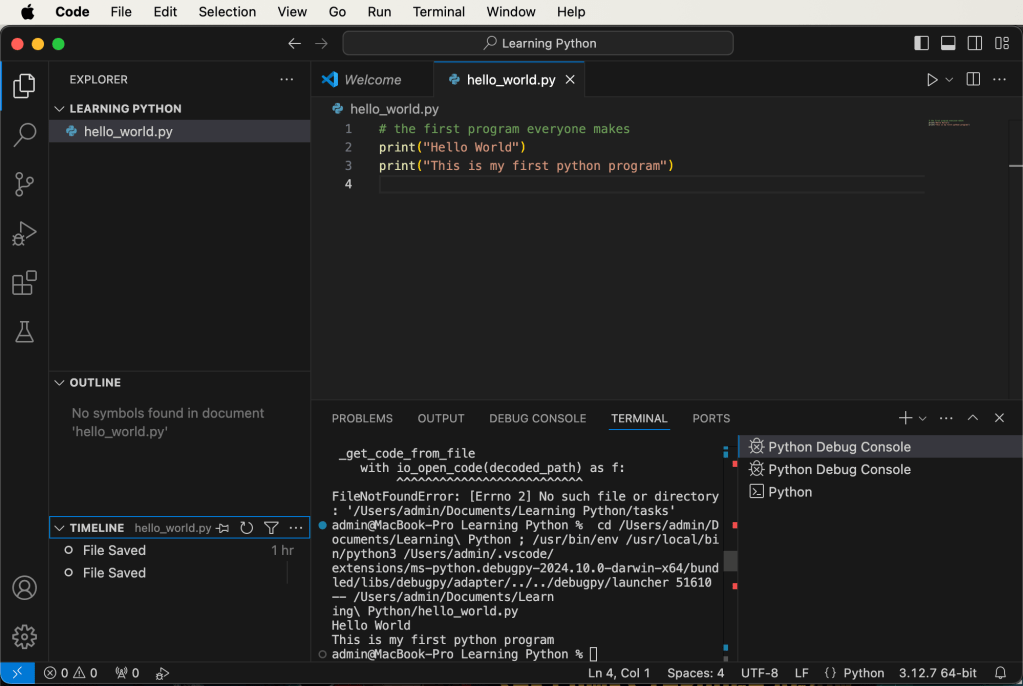
Here’s an example of an IDE called Visual Studio (VS) Code from Microsoft – it’s free and works on both Windows and MacOs. The IDE can be broken down into a common sections and functionality.
Code Editors
This is the main part of the IDE and the most helpful as it helps with the reading, writing and finding of the code you have on the screen. From the hello_world.py example above you can see that the writing is in different colours to show different types of code – green is a comment, functions are white (print) and strings are orange all on a calming black or dark background (staring at the same screen for long periods of time can be hard on the eyes).
The other thing you will see is line numbering where each line of code is numbered from the top of the page to the bottom. Line numbering is super important as it helps to identify where an error may be (not always) so you can home in and find it. This is especially true to interpreted languages which are read to the processor line by line (sort of) rather than in a single executable like you get with a compiled programming language.
The last thing the editor window provides is the very handy (although at times overwhelming) is auto-formatting and auto-complete/suggest. Auto formatting is important so your code is readable as programming is a world of tab marks to show how the code branches and then comes back again. For some languages the tab marks are part of the code so important but for languages it is just a way of making the code more readable and best practice. Auto complete/suggest helps to speed up the writing process as it will offer suggestions of what you may want to write as you write it. This helps not only with speed but accuracy as it will offer the correct language word or the variable that has already been defined some where in the code.
One hint I would offer is take your time when writing. It can be nice to smash out line after line of code but the more code you write the more you have to read so a little time considering things and modelling them really helps with the process. Flowcharts and pseudocode help sketch out what you are trying to get to following the abstraction, decomposition and computational thinking approach.
Error diagnostics
Writing code is really tricky as with the best will in the world when you run a perfectly structured code the computer just refuses to execute it correctly just times what feels like out of spite. But, computers are not spiteful – they are just machines (it just seems like it). The IDE provides an error window that shows where in the code there is a problem especially if the program is run in debug mode where the program can be run in parts so you can check where problems are or, if things are going well, then just check how well it’s going.
Run-time environment
Connected to the error check point there is a run-time environment which allows the program to be checked. This is what you would get if you just ran the code from the terminal where it could be executed. By having it attached to the IDE it’s all linked together so you can quickly (ahem) fix those pesky bugs (they can be tricky!). When a program is run the results are displayed in the Output window. This will show values or simply that the program has run successfully.
Translators
To allow the programs to run the code needs to be translated into machine code. The IDE will have these built in otherwise they would be pretty useless. IDEs often come with multiple translators as you may want to create a program with multiple languages.
File and Version Control Management
On the left hand side of all IDEs is a file view of all the files involved in program like you see in File Explorer in Windows or Finder on a Mac. This is a very handy thing to keep track of individual files for simple programs when you start. However, once things start to get bigger then you will have more files and different types of file (remember the part and reading and writing to a file?) and this requires management.
The next level of complexity is working with multiple files with multiple people. This creates multiple version and in order to keep things in order version control is needed. Version control is simply a way of marking out changes to documents when they change only recording what has changed. This way a change can be reverted if not accepted or rolled back. The IDE comes with the ability to hook into the version control software selected.
< Previous: Boolean Logic
 Compsortia